Kann man ein MacBook mit einem alten Apple iPad-Ladegerät laden? (Gemessen)
Wie moderne USB-C-MacBooks mit Apples 5W-, 10W- und 12W-USB-A-Netzteilen umgehen: Ein Protokoll-Fallback begrenzt den Mac auf 7,5W.

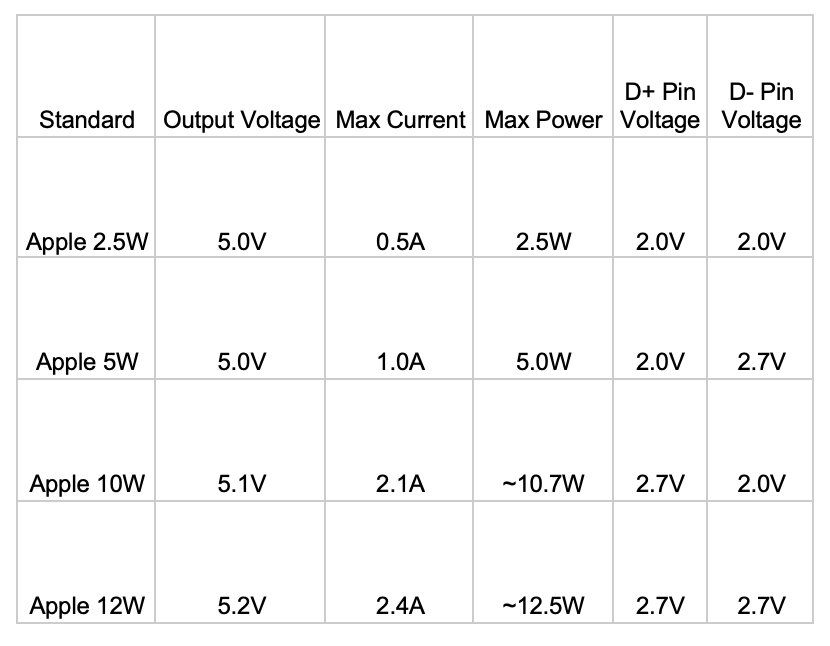
Ich hatte einen freien Nachmittag von der Arbeit, also beschloss ich, einen tiefen Einblick darin zu nehmen, wie Apples moderne USB-C-Geräte mit Apples veralteten Ladestandards umgehen. Bevor USB Power Delivery zur Norm wurde, lieferte Apple einige proprietäre Ladegeräte, die 0,5A, 1,0A, 2,1A und 2,4A über 5V / 5,1V bewarben. Die größeren 10W- und 12W-Adapter wurden typischerweise mit iPads mitgeliefert, und viele von uns haben sie noch irgendwo in Schubladen liegen.
Ich verwende meinen alten 12W Apple-Adapter noch immer für mein iPhone 17 Pro Max als langsames Nachtladegerät. Ich habe bestätigt, dass das iPhone die höhere Leistung korrekt aushandelt. Aber meine anhaltende Frage war: Nutzt mein Mac diese veralteten Ladeprofile über einen USB-C-Adapter?
Das Experiment
Ich testete drei Apple USB-A-Ladegeräte - die 5W, 10W und 12W Modelle - an einem M1 MacBook Air. Jedes Ladegerät wurde über einen USB-A-auf-USB-C-Adapter angeschlossen, mit zwei inline USB-C-Leistungsmessern zwischen dem Adapter und dem Mac, um die tatsächlich gelieferte Leistung zu messen. Parallel dazu überprüfte ich, was macOS selbst über Systeminformation und den internen Ladebus meldete.
Die Zahlen
| Ladegerät | Inline-Meter messen | macOS Systeminformation meldet | Ladebus meldet |
|---|---|---|---|
| Apple 5W (USB-A) | 5W | 8W | 5V / 1,5A |
| Apple 10W (USB-A) | 7W | 8W | 5V / 1,5A |
| Apple 12W (USB-A) | 7W | 8W | 5V / 1,5A |
Ein paar Dinge fallen auf:
- Das 5W-Ladegerät gibt seine Nennleistung sauber durch.
- Das 10W- und 12W-Ladegerät liefern beide laut Inline-Metern nur ~7W - weit entfernt von ihrer Etiketten-Leistung.
- macOS meldet 8W für alles, einschließlich des 5W-Ladegeräts, was offensichtlich falsch ist.
- Der interne Ladebus des Macs meldet konsistent 5V bei 1,5A für eingehende Leistung.
Was tatsächlich passiert
5V × 1,5A = genau 7,5W. macOS rundet das in der Systeminformation auf 8W auf, und die Inline-Meter runden auf 7W ab (sie messen eine leicht verlustbehaftete Verbindung durch den USB-A-Adapter). Alle drei Messungen stimmen überein: Der Mac zieht eine feste 1,5A bei 5V, unabhängig vom Etikett des Adapters.
Diese Zahl ist ein eindeutiges Zeichen - es ist die Standard-Obergrenze von USB Battery Charging 1.2 (BC 1.2), dem generischen Ladeerkennungsstandard, der USB Power Delivery vorausging. Wenn ein USB-Gerät ein Ladegerät sieht, das kein USB-PD spricht, fällt es auf BC 1.2 zurück und handelt bis zu 1,5A bei 5V aus.
Apples ältere 2,4A-Klasse-Ladegeräte signalisieren ihre höhere Kapazität über die USB-Datenpins mit einem proprietären Widerstandsteiler-Schema - weder BC 1.2 noch USB-PD. Das iPhone erkennt diese Signalisierung, weil iOS sie immer unterstützt hat. macOS, auf modernen USB-C-Macs, tut das nicht. Der Mac sieht also ein Ladegerät, das kein USB-PD spricht, kann Apples veraltete Teiler-Signalisierung über die adaptierten Pins nicht parsen und fällt sicher auf BC 1.2s konservative 1,5A-Grenze zurück.
Warum dasselbe Ladegerät ein iPhone mit voller Leistung lädt
Dein iPhone und dein Mac wenden verschiedene Regeln auf dieselben elektrischen Signale an. Wenn das iPhone Apples veraltetes Teilermuster an den D+/D–Pins erkennt, weiß es, dass es sicher 2,4A ziehen kann - so liefert ein 12W Apple-Adapter die vollen 12W. Der Mac, ohne diesen veralteten Erkennungscode-Pfad, begrenzt auf den BC 1.2-Standard. Es gibt kein Firmware-Update, das das behebt; es ist eine bewusste Designentscheidung, um den Lade-Stack auf der USB-C-Seite einfach und spezifikationskonform zu halten.
Praktisches Fazit
Wenn du einen alten Apple iPad-Adapter mit einem USB-A-auf-C-Adapter verwendest, um dein MacBook zu laden:
- Erwarte ~7,5W, nicht die Etiketten-Leistung. Das reicht kaum aus, um den Ruheverbrauch eines MacBook Air zu kompensieren, und definitiv nicht genug, um es zu laden, während du es tatsächlich verwendest.
- Derselbe Adapter liefert einem iPhone noch immer die volle Nennleistung - das iPhone erkennt Apples veraltete Signalisierung über die Datenpins; macOS auf USB-C-Macs nicht.
- Für echtes MacBook-Laden verwende einen USB-C-Adapter, der USB Power Delivery spricht. Alles ab 30W+ lädt ein MacBook Air mit vernünftiger Geschwindigkeit; die 14"/16" MacBook Pros wollen jeweils 67W+ und 96W+.
Wenn du neugierig bist, was gerade in deinen Mac fließt, öffne das Menüleisten-Popup von USB Connection Information und du siehst die beworbenen PD-Profile (oder deren Fehlen, wie in diesem Fall). Es macht den Unterschied zwischen “USB-PD Ladegerät, das korrekt aushandelt” und “BC 1.2 Fallback bei 7,5W” auf einen Blick sichtbar - kein Inline-Leistungsmesser erforderlich.
Quellen & weiterführende Literatur
- USB Power Delivery Spezifikation (usb.org) - die PD-Spezifikation, die moderne USB-C-Ladegeräte implementieren.
- USB Battery Charging Spezifikation 1.2 (usb.org) - der BC 1.2 Fallback-Standard, den der Mac verwendet, wenn kein USB-PD ausgehandelt wird.
Verwandte Anleitungen
- Warum lädt mein Mac langsam? USB-C Power Delivery überwachen
- USB-C-Kabel mit und ohne eMarker-Chips
- Warum sind manche USB-C-Kabel auf 100W begrenzt? EPR erklärt
- Ist mein iPhone über USB 2.0 oder USB 3 verbunden?
Für Echtzeit-Einblick in andere Verbindungstypen deines Macs sieh dir den Rest der Connection Information Suite an - Audio, Displays und Netzwerk.