Why Only Apple Chargers Show Their Name on Mac
Apple chargers show up as 'Apple 96W USB-C Power Adapter'; third-party ones show 'Power Supply'. Why that happens, and what data is still available.

Plug an Apple charger into a Mac and macOS shows the full identity: “Apple 96W USB-C Power Adapter”, with firmware version, serial number, and the negotiated wattage. Plug in any third-party USB-C charger and the same Mac shows - Power Supply. No brand. No model. Just the wattage and a list of voltage profiles.
That’s not a bug or a missing feature. It’s a deliberate consequence of how USB Power Delivery works.
How Apple chargers identify themselves
When you plug an Apple charger into a Mac, the two devices speak more than just standard USB Power Delivery to each other. Apple’s chargers carry a proprietary extension to USB-PD designed specifically for the Apple ecosystem. Because Apple controls both ends of the conversation - the charger’s firmware and the macOS-side API surface - that extension can carry rich identity data:
- The friendly product name (“96W USB-C Power Adapter”, “40W Pwr Adapter 60W Max”)
- The exact model identifier
- The firmware version
- The hardware revision
- The serial number
USB Connection Information reads all of that and displays it alongside the live wattage and PD profile list.
Why third-party chargers don’t
Every non-Apple USB-C charger speaks the standard USB Power Delivery protocol. That protocol is excellent at what it’s designed for - negotiating safe voltage and current between strangers - but it isn’t a product-identification mechanism. The standard handshake covers:
- Supported voltage/current profiles (PDOs)
- Maximum power tier
- The negotiated PD spec revision (1.0 / 2.0 / 3.0 / 3.1 / 3.2)
None of that includes “the brand is Brand X” or “the model is Model Y.” A third-party charger speaking only standard USB-PD has no place in the protocol to announce its name to a Mac - so the Mac defaults to a generic “Power Supply” label.
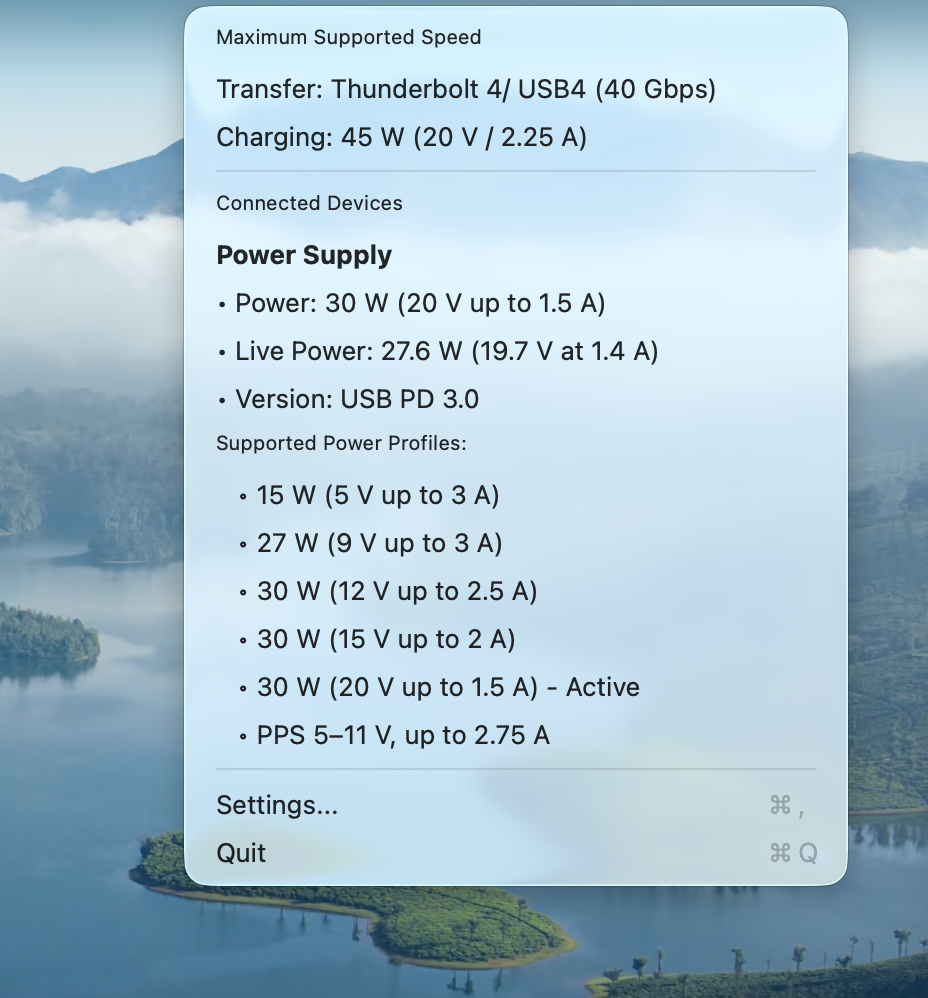
This is a 30W third-party charger. The wattage is correct. The voltage profiles are correct. The variable-voltage range (“PPS 5–11 V, up to 2.75 A”) is correct. The only thing missing is the name - because the protocol the charger speaks doesn’t carry one.
Battery banks are a special case
USB-C battery banks have to negotiate as both source and sink - they can charge your Mac, and your Mac can charge them. That bidirectional capability is part of the standard USB-PD spec, so even third-party banks declare it during negotiation:
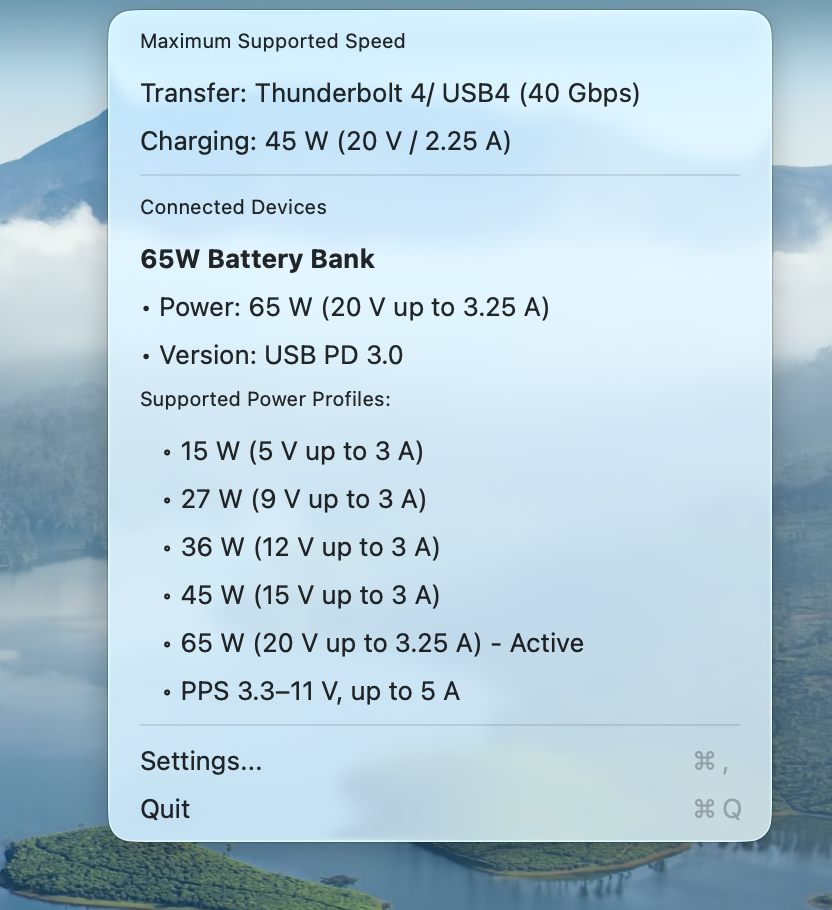
The app reads that capability flag and labels the device “Battery Bank” instead of “Power Supply” - even though the brand name is still missing. Wattage, PD profile list, and variable-voltage range all come through as usual.
Connected USB devices are different
The “anonymous charger” problem is specific to power adapters and PD negotiation. Once a charger or dock starts presenting connected USB devices to the Mac, those devices identify themselves through a completely separate mechanism - standard USB enumeration - that does include vendor and product IDs. So a connected dock, drive, keyboard, or display can be identified down to the model:
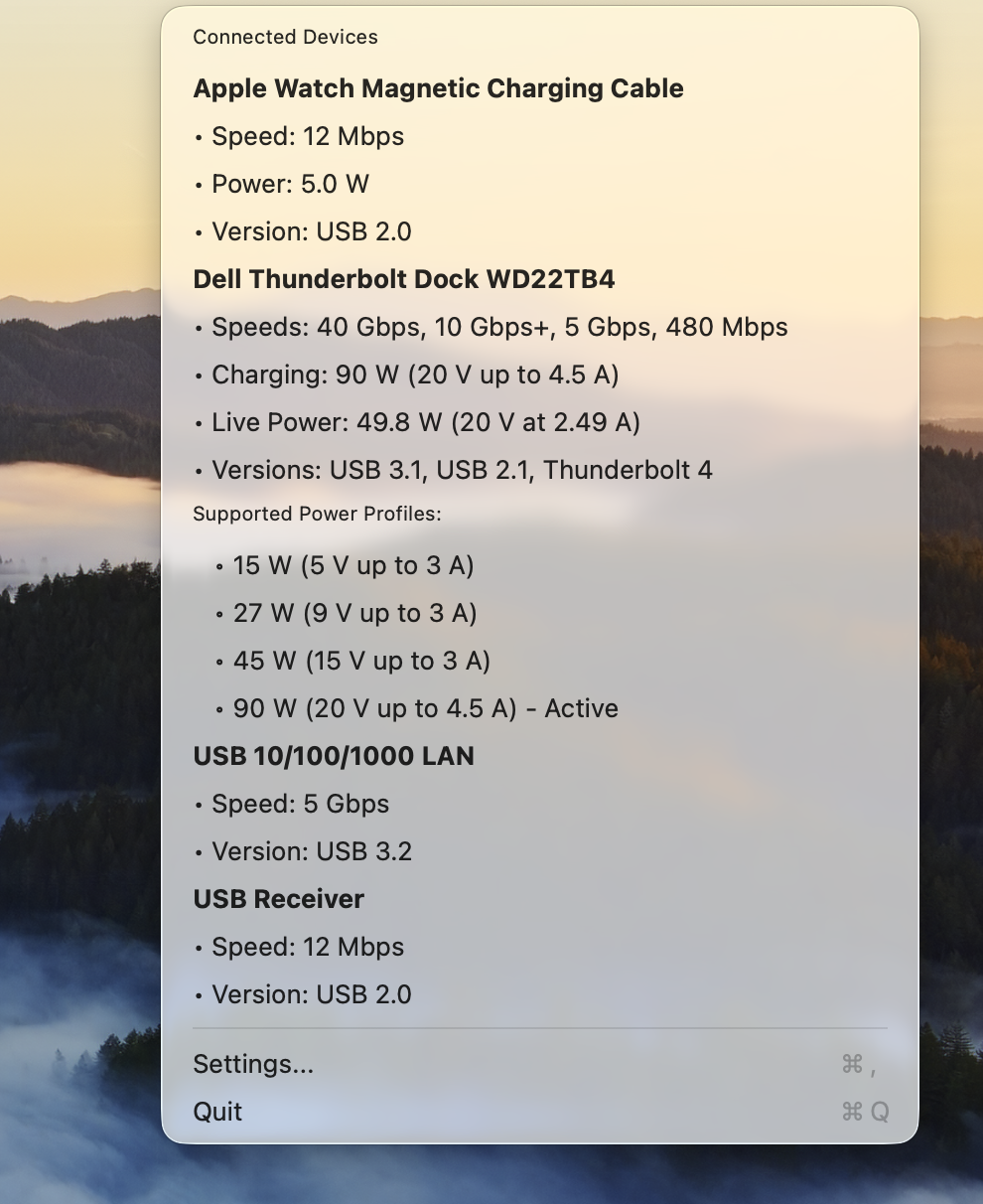
This is the same Mac, the same app. The dock identifies as “Dell Thunderbolt Dock WD22TB4” because every USB device announces its vendor and product ID as part of getting on the bus - that’s been part of the USB standard since 1996. The dock is using one protocol; the charger powering it is using a different one. Only one of those protocols carries identity.
What this means for you as a Mac user
- An Apple charger gives you the richest possible information on Mac - name, model, firmware, serial, wattage, and full PD profile list.
- A third-party charger gives you accurate wattage and PD profiles, but no brand or model. That’s a property of the USB-PD standard, not a limitation of the app or of macOS.
- A battery bank is correctly identified as a battery bank (rather than mislabelled as a wall charger) thanks to the bidirectional capability flag in standard USB-PD.
- Connected USB devices through a dock or hub are usually identified down to the model, because USB enumeration carries that data.
Practical checklist
- If a charger shows as “Power Supply”, that’s expected for any non-Apple USB-C charger. The wattage and PD data is still real and accurate.
- If even your Apple charger shows as “Power Supply” for more than a few seconds after plugging in, the cable is probably the culprit - re-seat or swap the cable.
- If you want maximum information at a glance, an Apple charger is uniquely well-supported on Mac for the reasons above.
- For PD profile depth, every charger reports profiles regardless of brand - that’s where USB Connection Information adds real value even for unnamed chargers.
Sources & further reading
- USB Power Delivery Specification (usb.org) - the standard protocol that third-party chargers use to negotiate with a Mac.
Related guides
- Why is my Mac charging slowly? Monitoring USB-C Power Delivery
- USB-C cable e-marker chips explained
- USB-C 100W vs 240W cables
For real-time visibility into the rest of your Mac’s connections, see the Connection Information suite - audio, displays, and network.